
Overview
A Break in Learning (BIL) allows you to temporarily pause a learner’s apprenticeship programme without withdrawing them. During this period, progress and OTJ expectations are paused, and learners are not expected to engage in learning.
Who Can Use This Feature?
- Centre Manager
- Assessor (with Manage Learners permission)
- Internal Verifier (with Manage Learners permission)
Centre Settings
The Centre may enable restrictions on learning activity during a BIL via the following setting:
- Learning activity falls on a break in learning — prevents learners from adding OTJ during a BIL.
Recording a Break in Learning
Step 1: Navigate to the Learner’s Portfolio
Step 2: Open the Episode Page
- Click the Episode tab.
Step 3: Add a New Break in Learning
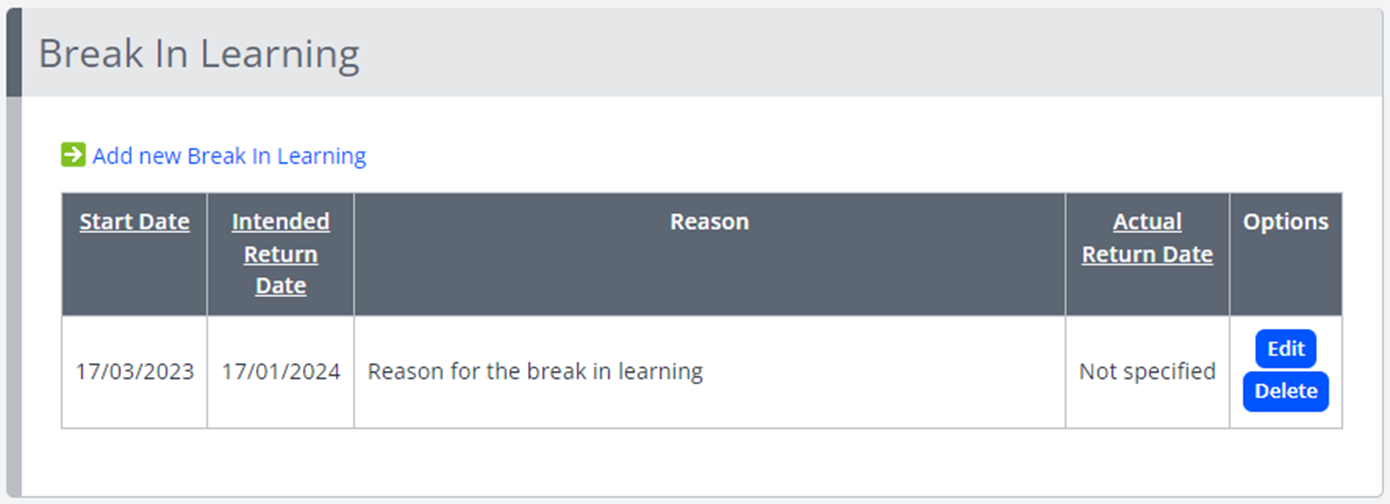
- Locate Break in Learning.
- Click Add New Break in Learning.
- Enter:
- Start Date – when the break begins
- Intended Return Date
- Reason for the BIL
- Click Save.
Recording a Learner’s Return from Break
Step 1: Access the Return Screen
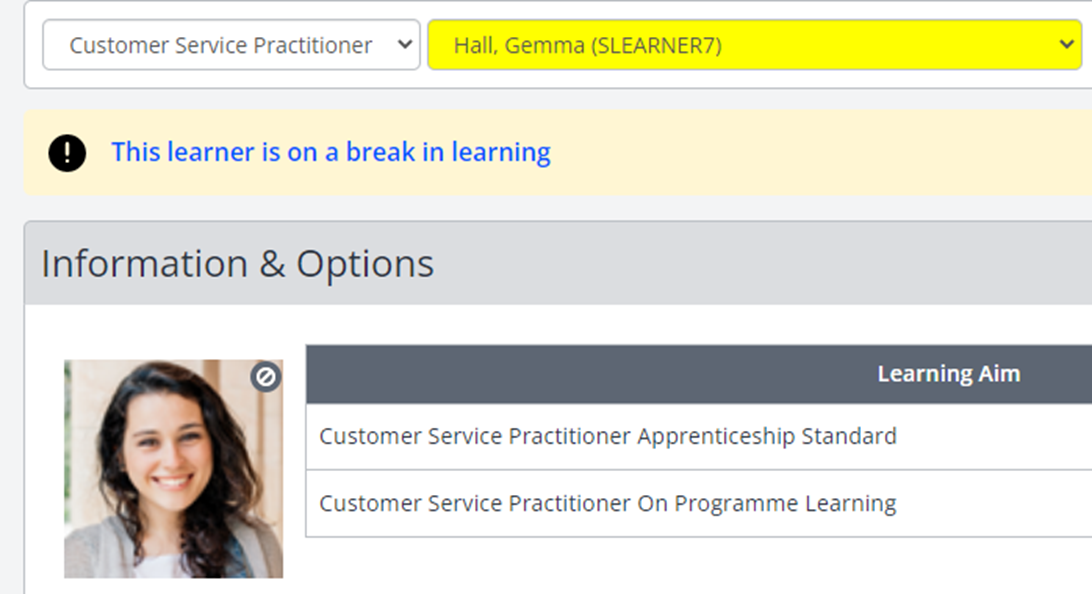
- Navigate to the learner’s Episode page, or click the banner “This learner is on a break in learning” on their portfolio.
Note: If the banner is not clickable, you do not have permission to view the Episode page.
Step 2: Enter the Return Date
- Click Edit on the relevant BIL record.
- Enter the Actual Return Date.
- Click Save.
Off‑the‑Job (OTJ) Training During a Break
- Expected OTJ hours and target OTJ % are paused during a BIL.
- Learners cannot add OTJ if your centre has enabled the setting “Learning activity falls on a break in learning.”
Progress Calculation
Unit‑level target progress now excludes break periods when calculating timelines. This provides a more accurate representation of learner expectations.
- The overall structure of Learning Aim Target Progress and Overall Target Progress remains unchanged.
- Weightings continue to apply as configured.
How It Works
- Total Active Duration = Unit Duration − Break Duration
- Elapsed Active Time = Time since unit start, excluding break time
Unit Target Progress % = (Elapsed Active Time ÷ Total Active Duration) × 100
To align planned timelines, you may extend unit or learning aim end dates to account for the break period. This ensures progress expectations remain realistic.
✅ Tip: Always consider adjusting planned end dates after a long BIL to avoid unrealistic target progress jumps.
Terminology
Terminology in this article may differ depending on your Centre.
❓Need Help?
If you encounter any issues or have questions, please contact Onefile Support or your internal support channels.