
Overview
Target progress indicates how far a learner is expected to be at a given point in time for:
- A unit
- A learning aim
- Their overall portfolio
This helps track whether learners are on schedule to meet their deadlines.
Centre Setting Impact
If your Centre has enabled "Apply weightings to target progress", the calculations will include unit or learning aim weightings.
For more information, see the article on Progress Weightings.
Unit Target Progress
Unit target progress is calculated using the following:
- Unit Start Date
- Unit Anticipated Completion Date
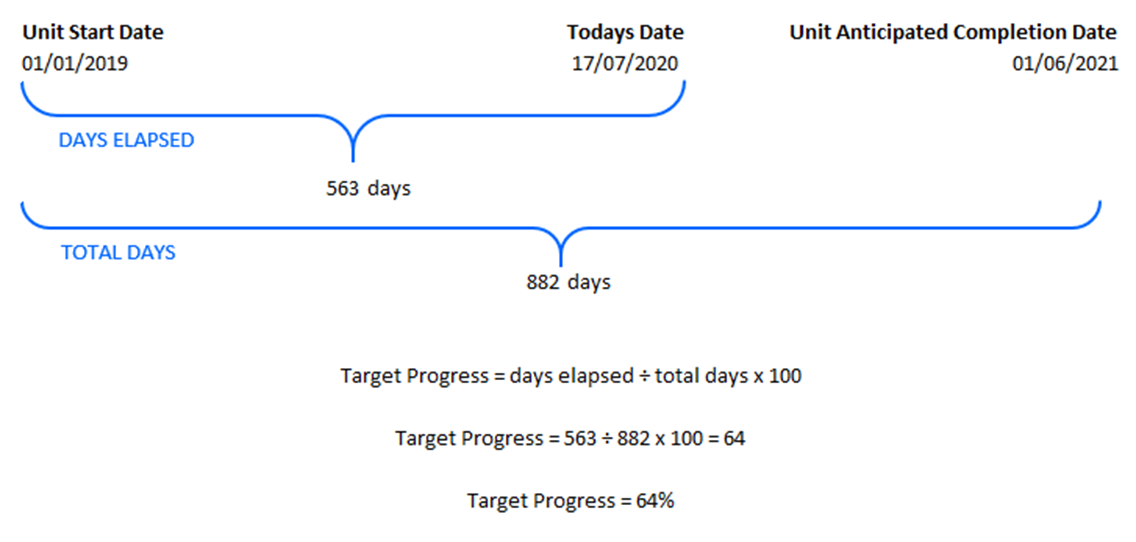
Learning Aim Target Progress
Calculated by taking an average of the target progress for all selected units within the learning aim.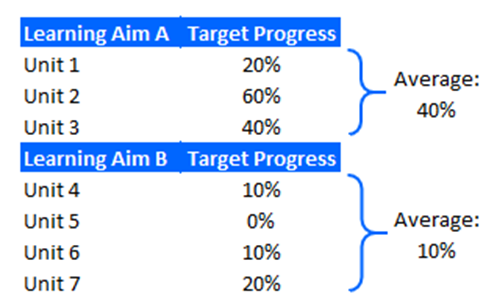
Overall Target Progress
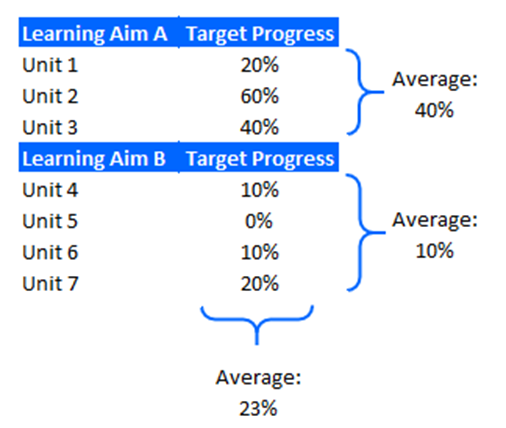
Calculated by taking an average of the target progress for all selected units across the learner’s portfolio.
Troubleshooting
| Issue | Solution |
|---|---|
| Target progress looks incorrect | Check the start and anticipated completion dates for units and learning aims. |
| Weightings not applied | Confirm that the Centre setting "Apply weightings to target progress" is enabled. |
✅ Tip: Ensure all units have accurate dates entered to maintain correct progress tracking.
Terminology
Please note that the terminology used in this article may be different depending on your Centre.
❓Need Help?
If you encounter any issues or have questions, please contact OneFile Support or your internal support channels.