
Overview
Centre Managers can enable Off-The-Job (OTJ) tracking to compare a learner’s actual Off-The-Job hours against the expected hours to date. This provides clearer visibility of learner progress and supports compliance with funding requirements.
User Roles
This feature can be used by the following user role:
- Centre Manager
Centre Setting
To enable this feature, ensure the following Centre Setting is switched on:
- Calculate Expected OTJ to date
Steps to Enable Expected OTJ Tracking
- Click Centre on the left-hand navigation bar.
- Click Settings.
- Scroll down to the Miscellaneous section.
- Under Timesheets, click Calculate Expected OTJ to date.
- Set your thresholds for comparison.
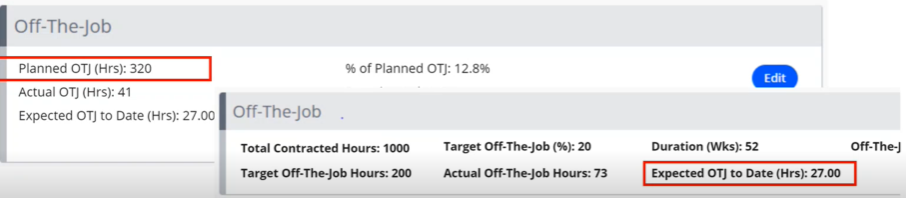
Expected OTJ Calculation
Learners with a start date before 01/09/2022:
(Weeks to date ÷ Duration (weeks)) × Target OTJ
Learners with a start date on or after 01/09/2022:
(Weeks to date ÷ Duration (weeks)) × Planned OTJ
You can also report on expected OTJ using the Learners Expected OTJ Progress report.
Terminology
The terminology used in this article may differ depending on your Centre’s configuration.
Need Help?
If you encounter any issues or have questions, please contact Onefile Support or your internal support channels.